With a local Claude Code Routine I can monitor all Umbraco v15+ logs and get bugfix suggestions. All I have to do is validate and test the suggested fixes before putting them in production.
This local Routine is safe, because Claude does not have direct access to the client credentials. All it does is analyse the errors against the codebase and suggest bugfixes on separate branches.
The Setup
The following setup works on Umbraco v17+.
User Group
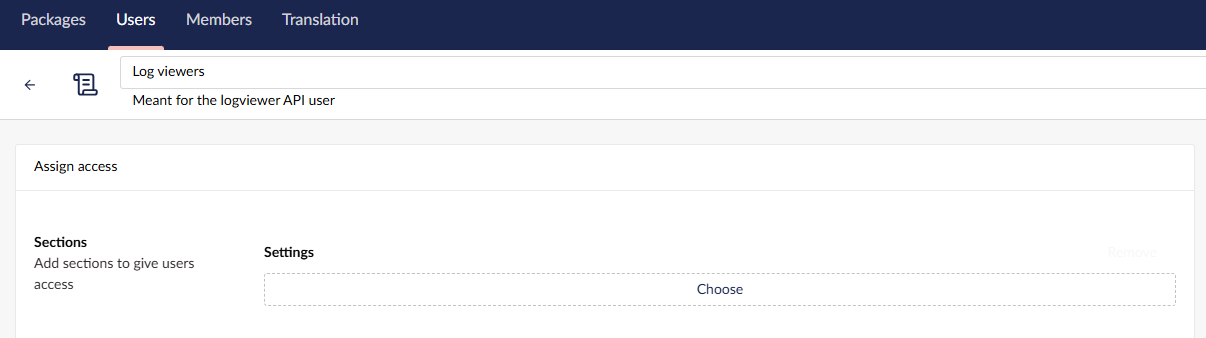
Add a "Log viewers" user group that only has access to the Settings section.
API User
Add a "Log viewer" API User and add it to the Log viewers user group.
Client Credentials
Add Client Credentials for the Log viewer API User. Make sure the Client Id is unique across implementations and environments, so you won't have collisions loading the secrets later on. I suggest: "umbraco-back-office-{clientAbbreviation}-{projectAbbreviation}-{environment}-logviewer". So for example: "umbraco-back-office-acmecorp-website-prd-logviewer".
Generate a sufficiently long Client Secret and save that in your password manager. Add the Client Secret as an environment variable (or whatever other setup you use) so the script can access it, but the Client Secret isn't exposed to Claude Code. Use the following format: "{clientId}_secret", so in the above example the environment variable name would be: "umbraco-back-office-acmecorp-website-prd-logviewer_secret". On Windows you can use the setx command for this.
The Load Logs script
Place the following script on a central location on your machine. This implementation uses PowerShell, but use whatever you like:
#!/usr/bin/env pwsh

param (
    [Parameter(Mandatory = $true, Position = 0)]
    [string]$Domain,

    [Parameter(Mandatory = $true, Position = 1)]
    [string]$ClientId,

    [Parameter(Mandatory = $false, Position = 2)]
    [bool]$IncludeWarnings = $false
)

$ErrorActionPreference = "Stop"

# Remove a trailing slash from the domain.
$Domain = $Domain.TrimEnd('/')

# The client secret is stored in an environment variable named:
#
#   <client-id>_secret
#
# For example:
#
#   my-api-user_secret
#
$SecretEnvironmentVariable = "${ClientId}_secret"
$ClientSecret = [Environment]::GetEnvironmentVariable($SecretEnvironmentVariable)

if ([string]::IsNullOrWhiteSpace($ClientSecret)) {
    Write-Error "Environment variable '$SecretEnvironmentVariable' is not set."
    exit 1
}

# ---------------------------------------------------------------------------
# Get bearer token
# ---------------------------------------------------------------------------

$TokenUrl = "$Domain/umbraco/management/api/v1/security/back-office/token"

$TokenBody = @{
    grant_type    = "client_credentials"
    client_id     = $ClientId
    client_secret = $ClientSecret
}

$TokenResponse = Invoke-RestMethod `
    -Uri $TokenUrl `
    -Method Post `
    -ContentType "application/x-www-form-urlencoded" `
    -Body $TokenBody

$Token = $TokenResponse.access_token

if ([string]::IsNullOrWhiteSpace($Token)) {
    Write-Error "Failed to obtain an access token."
    exit 1
}

# ---------------------------------------------------------------------------
# Get errors from the last 24 hours
# ---------------------------------------------------------------------------

$From = (Get-Date).ToUniversalTime().AddHours(-24).ToString("yyyy-MM-ddTHH:mm:ss.fffZ")
$To   = (Get-Date).ToUniversalTime().ToString("yyyy-MM-ddTHH:mm:ss.fffZ")

$LogUrl = "$Domain/umbraco/management/api/v1/log-viewer/log"

$Headers = @{
    Authorization = "Bearer $Token"
    Accept        = "application/json"
}

$QueryParameters = @{
    startDate = $From
    endDate   = $To
    skip      = 0
    take      = 1000
}

# Build the query string.
$QueryString = ($QueryParameters.GetEnumerator() | ForEach-Object {
    "$([Uri]::EscapeDataString($_.Key))=$([Uri]::EscapeDataString([string]$_.Value))"
}) -join "&"

$QueryString += "&logLevel=Fatal&logLevel=Error"

if ($IncludeWarnings) {
    $QueryString += "&logLevel=Warning"
}

$Response = Invoke-RestMethod `
    -Uri "$LogUrl`?$QueryString" `
    -Method Get `
    -Headers $Headers

# Pretty-print the JSON response.
$Response | ConvertTo-Json -Depth 10
The Routine
Add a new local Claude Code Routine. Make sure you set the folder to the correct project and the branch to the branch that represents the environment you're monitoring. Usually that would be the main branch for the production environment.
Enable Worktree so Claude Code doesn't interfere with any changes you're working on. Set the schedule to repeat on Weekdays at whatever time suites you (make sure your machine is on at that time!).
Last but not least give the routine these instructions:
- Sync your worktree with its origin branch.
- Execute the powershell command "C:\LogViewer\LoadLogs.ps1 https://www.acmecorp.com/ umbraco-back-office-acmecorp-website-prd-logviewer".
- Group similar errors.
- For each group:
-- Identity if the error is (still) in the implementation.
-- If it is, create a branch with a short descriptive name.
-- Apply a fix and commit it on the new branch.
- Notify me of any applied fixes and/or if no fix can be found for an error group.
The Result
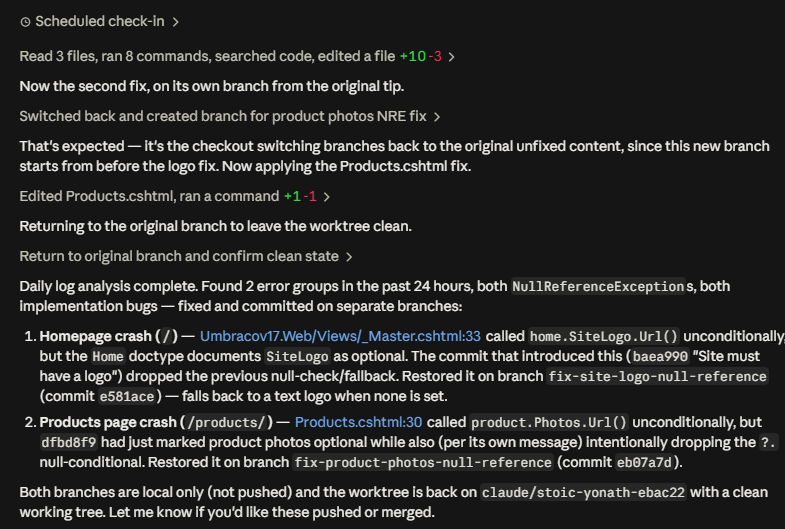
This is the result from the Routine after I've intentionally introduced two Null Reference Exceptions in Umbraco.TheStarterKit:
Enjoy!
About Boris Eetgerink
Hey, thanks for reading. I'm a support engineer with over 20 years of development experience. I blog about whatever occupies my mind the most at the time. Feel free to connect with me on LinkedIn.