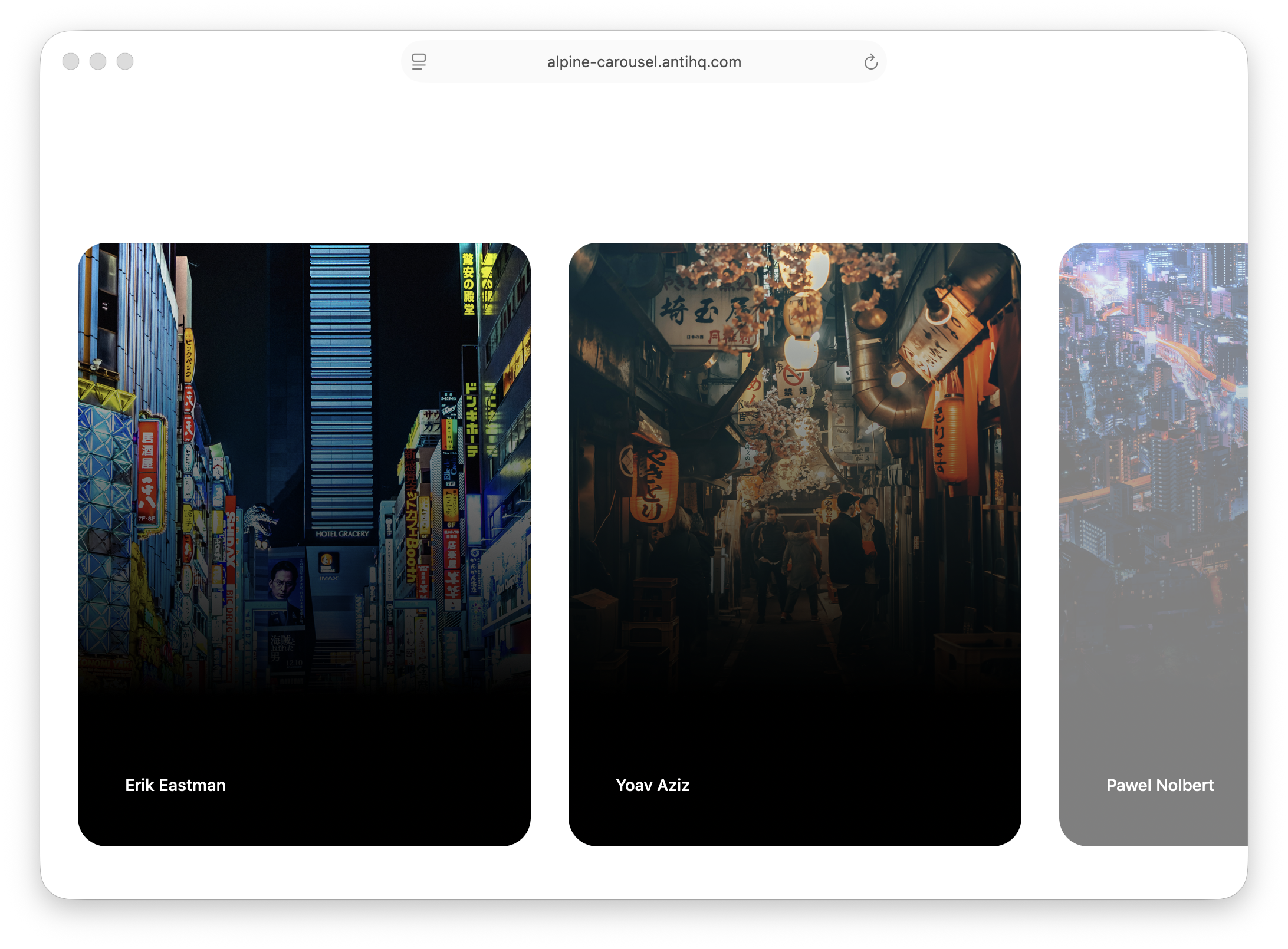
I needed a carousel for demo screenshots. Found the perfect one. Mobile-friendly, elegant dot navigation, smooth scroll-snap, beautiful opacity transitions for overflow items.
But it was built with React and Framer Motion. My stack used Alpine.js.
The existing Alpine carousel options? Too basic. They worked, but they didn't feel premium. No smooth transitions, no visual cues for items outside the viewport, no satisfying snap behavior on mobile.
So I ported the approach. And here's what surprised me: I achieved similar polish with less complexity.
Most carousels are functional but forgettable. You click through them, you forget them.
The ones that stick with you have specific details.
Dot navigation that respects your intent. When you click a dot, the carousel scrolls automatically to show that item first. Not somewhere in the middle, not partially visible. First. This small behavior makes navigation predictable and satisfying.
CSS scroll-snap that works everywhere. On mobile, you swipe and the carousel completes the motion for you, snapping to the nearest item. On desktop, the same behavior applies. No janky half-visible states. The scroll feels physical, like it has weight and intention.
Dynamic opacity for overflow items. Items within the container appear at full opacity. Items partially visible or completely outside? Reduced opacity. As you scroll, the opacity adjusts in real-time. This creates a subtle but powerful visual cue: you've seen these, and there are more waiting over there.
These aren't just aesthetic choices. They're communication. They tell users where they are, where they've been, and where they can go next.
I found all of this in a Tailwind CSS template from Radiant. Beautiful implementation. But it used React and Framer Motion.
My project used Alpine.js. A lighter stack for simpler interactivity. Adding React just for one carousel felt wrong. Like hiring a moving truck to carry a single box.
So I had a choice: settle for a basic carousel, or figure out how to recreate that premium feel with the tools I already had.
Here's what I discovered: you don't need Framer Motion for smooth interactions. You need thoughtful CSS and a little JavaScript.
Alpine.js handles state: which dot is active, which items should be visible, tracking scroll position.
Vanilla JavaScript handles scroll tracking. Listening to scroll events, calculating which items are in view, updating opacity dynamically.
CSS scroll-snap handles the physics. The browser's native scroll-snap API gives you that satisfying snap behavior without any JavaScript. It's smooth on mobile, smooth on desktop, and it just works.
Scroll position calculation handles opacity. On each scroll event, calculate how much of each card is visible within the container bounds and set opacity proportionally.
The architecture is straightforward: a container with scroll-snap, items with dynamic opacity based on scroll position, and dot navigation synced to scroll position. No virtual DOM. No animation library. Just state management, scroll events, and CSS.
The carousel tracks each card's position relative to the container bounds. As the user scrolls, opacity adjusts smoothly.
Cards fully in view have opacity 1. Cards partially outside the bounds scale proportionally with how much is visible. The minimum opacity is 0.5, so cards never disappear completely.
The implementation uses a computeOpacity() method that checks if a card is outside the left or right edge of the container, calculates what percentage is outside, and sets opacity accordingly. A card that's 50% outside the viewport has 50% opacity.
A ResizeObserver keeps the container bounds accurate when the window resizes, ensuring the opacity calculations stay correct.
Opacity is set directly via Alpine's style binding. The opacities array holds the current opacity value for each card. Alpine updates these values on every scroll event, and the CSS transition-opacity class ensures the changes animate smoothly.
No opacity classes to toggle. Just a reactive array bound to inline styles.
For dot navigation, when you click dot #3, the carousel scrolls to item #3. But the reverse needs to happen too: as you scroll, the active dot updates to reflect your position.
This means dots have click handlers that call scrollTo(index), and a scroll listener updates activeIndex state. Alpine reactivity updates which dot appears active.
It's a two-way sync, but Alpine's reactivity makes it natural.
The magic that makes the carousel feel physical is CSS scroll-snap:
.carousel-container {
  scroll-snap-type: x mandatory;
  overflow-x: auto;
}

.carousel-item {
  scroll-snap-align: start;
}
That's it. The browser handles the snap behavior. No JavaScript physics, no animation timing functions. Just CSS telling the browser: "when scrolling stops, snap to the start of an item."
You can play with the carousel here: alpine-carousel.antihq.com
Full source code: github.com/antihq/alpine-carousel
The photos used in the demo:
- People crossing road
- Men in black suits in hallway
- Timelapse of vehicles and buildings
- Aerial view of crosswalk
- Roadway beside buildings
- Vehicles on roadway at night
You don't need heavy frameworks for sophisticated interactions.
Framer Motion is powerful, but for many use cases, you can achieve similar results with CSS scroll-snap for physics, scroll position tracking for visibility, and a lightweight reactivity layer like Alpine.js for state.
The complexity isn't in the tools, it's in understanding which details matter. The opacity transitions, the snap behavior, the dot navigation sync. Those are the pieces that make a carousel feel premium.
Once you identify those details, the implementation becomes straightforward. You're not fighting the framework. You's using the right tool for each job.
That's the lesson I keep learning: before reaching for a library, ask yourself what behavior you actually need. Often, the browser already has an API for it. Often, a little CSS goes further than you think.
And sometimes, the constraint of a lighter stack forces you to discover simpler solutions that work just as well.