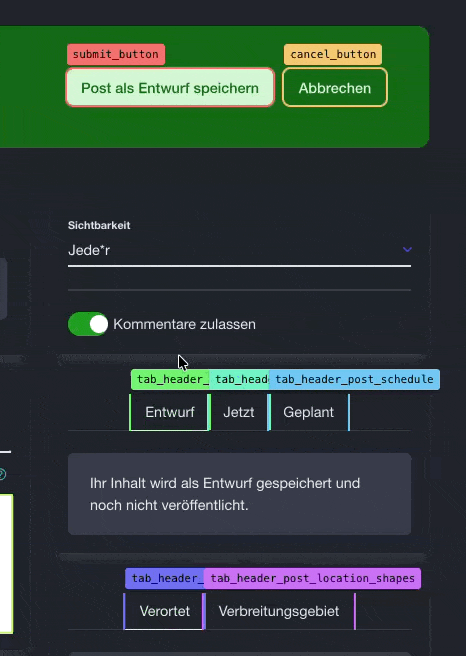
A small bookmarklet I use to highlight `data-testid` attributes to find out easily which elements still need one.
It can of course be easily adjusted to other attributes.
Just create a new bookmark in your favourite browser and paste the following code into the URL field:
javascript:(function(){const baseZ=999999;const els=document.querySelectorAll('[data-testid]');els.forEach((el,i)=>{const t=document.createElement('div');t.textContent=el.dataset.testid;const hue=Math.round((i/els.length)*360);const bg='hsl('+hue+',85%,70%)';t.style.cssText='position:absolute;background:'+bg+';color:#000;padding:2px 6px;font-size:11px;border-radius:3px;z-index:'+baseZ+';pointer-events:auto;box-shadow:0 1px 3px rgba(0,0,0,.3);white-space:nowrap;font-family:monospace;cursor:pointer;';t.addEventListener('mouseenter',()=>t.style.zIndex=baseZ+1000);t.addEventListener('mouseleave',()=>t.style.zIndex=baseZ);document.body.appendChild(t);const r=el.getBoundingClientRect();t.style.top=(r.top+window.scrollY-t.offsetHeight-4)+'px';t.style.left=(r.left+window.scrollX)+'px';el.style.outline='2px solid '+bg;});})();
Easier to read function code (because you shouldn't just run everything someone posted on the internet):
function () {
    const baseZ = 999999;
    const els = document.querySelectorAll('[data-testid]');
    els.forEach((el, i) => {
        const t = document.createElement('div');
        t.textContent = el.dataset.testid;
        const hue = Math.round((i / els.length) * 360);
        const bg = 'hsl(' + hue + ',85%,70%)';
        t.style.cssText = 'position:absolute;background:' + bg + ';color:#000;padding:2px 6px;font-size:11px;border-radius:3px;z-index:' + baseZ + ';pointer-events:auto;box-shadow:0 1px 3px rgba(0,0,0,.3);white-space:nowrap;font-family:monospace;cursor:pointer;';
        t.addEventListener('mouseenter', () => t.style.zIndex = baseZ + 1000);
        t.addEventListener('mouseleave', () => t.style.zIndex = baseZ);
        document.body.appendChild(t);
        const r = el.getBoundingClientRect();
        t.style.top = (r.top + window.scrollY - t.offsetHeight - 4) + 'px';
        t.style.left = (r.left + window.scrollX) + 'px';
        el.style.outline = '2px solid ' + bg;
    });
}